A look inside
Your wrap design department, without hiring one.
WDS Studio is the private portal your shop gets with Wrap Design Supply. Send us a vehicle, watch the design come together, approve proofs, and pull production-ready files — while your customer sees everything under your brand.
Send a project in minutes
Vehicle info, wrap type, scope, end-customer contact, photos and brand assets — one guided form, nothing lost in a text thread.
Measure right on the photo
Drop measurement lines and labels straight onto a vehicle photo so the designer builds to your real numbers.
Proofs with real approvals
Every version is kept. Approve, or request a revision with notes — no guessing which file is current.
One thread per project
All conversation, files, and decisions live with the project. Nobody digs through email.
Your own lead form
A permanent branded link or QR code you send to your customers. Their request lands in your inbox and becomes a project in one click.
Proofs to your customer, under your name
Send the proof to the end customer branded as your shop. Their replies come back into your project thread.
You approve the outgoing message
The designer uploads the proof and drafts the customer message. You get an approval prompt before anything goes out to your customer under your shop’s brand.
Production-ready files, versioned
Final print files are released to you in the project, tracked by version. Download anytime — including on finished jobs months later.
Your whole team, one portal
Invite as many people from your shop as you want. Everyone sees the same projects, proofs, and messages.
Lead to project
Your customer fills out a form. You click once. The project is built.
No retyping vehicle info. No hunting for the photos they texted you. The request arrives complete and becomes a live project with the files already attached.
Your customer fills out your form
You send your permanent branded link or QR code. They enter vehicle, wrap details, budget, timing, and upload their own photos and logos.
It lands in your Requests inbox
The moment they hit submit it appears in your portal — nothing to forward, retype, or chase down.
One click turns it into a project
Every field auto-fills and their uploaded files come with it. Review, adjust anything, and it's in our design queue.
One-tap approval
We do the follow-up. You just say go.
The designer uploads the proof and drafts the message to your customer. You receive an approval prompt with the prepared message — tap Approve & send to release the email under your shop's branding. For a text from your own number, open the prepared text on your phone and send it there. Automatic email sending is optional.
- Nothing ever reaches your customer without your say-so — unless you choose otherwise.
- Messages are written for you, branded as your shop.
- Prepared texts open on your own phone — you send from your real number.
- Your customer's approval or change request comes straight back into the project.
Approve the outgoing proof message in one click
Keep every proof version and decision
Send under your shop’s name
Bring customer replies back into the project
The walkthrough
Exactly what you'd see after logging in
Step 1
Your dashboard
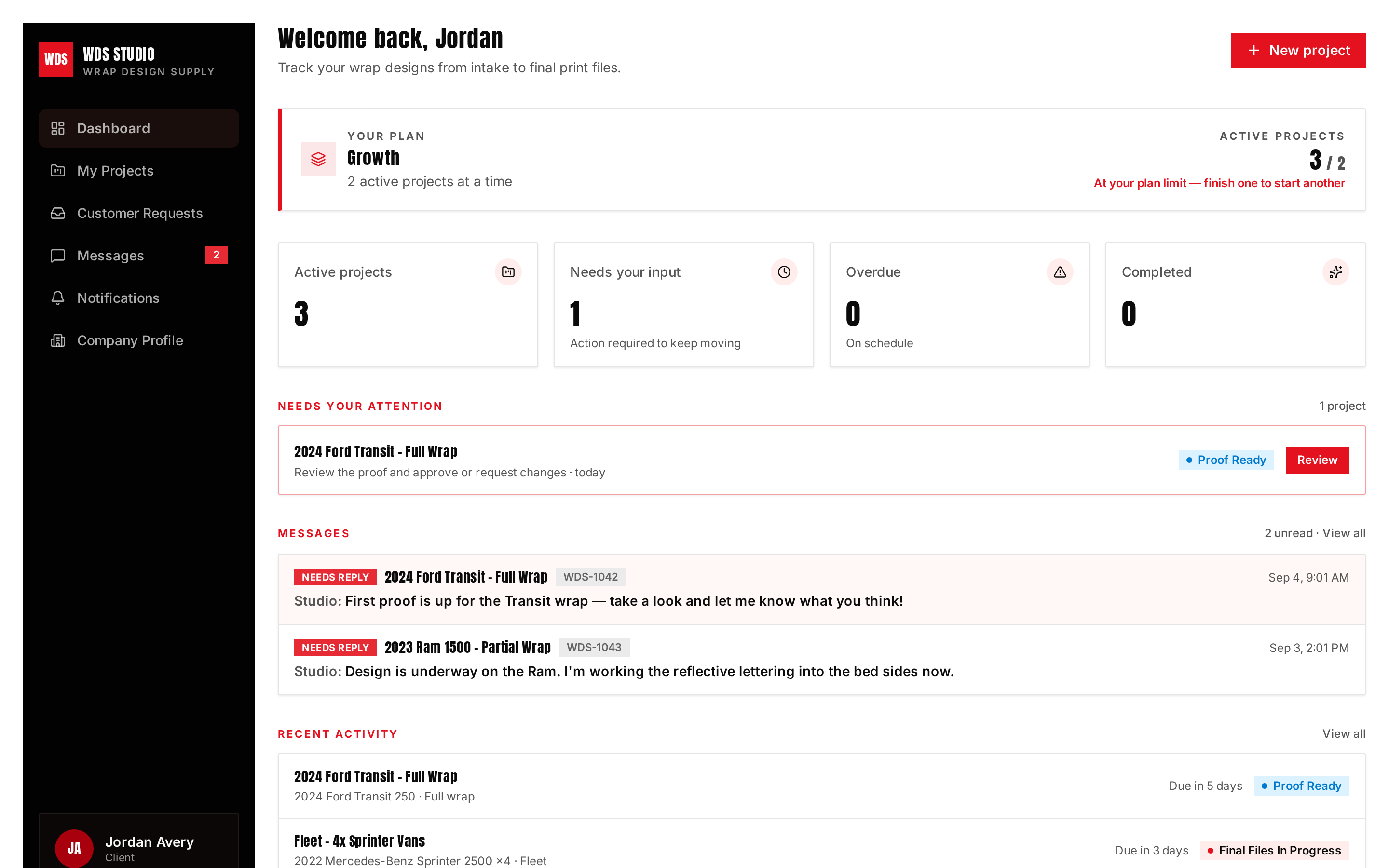
Open the portal and see exactly what needs you: active projects, proofs waiting on approval, and files ready to download. Your plan and how many active projects it covers sits right at the top.
Step 2
All your projects
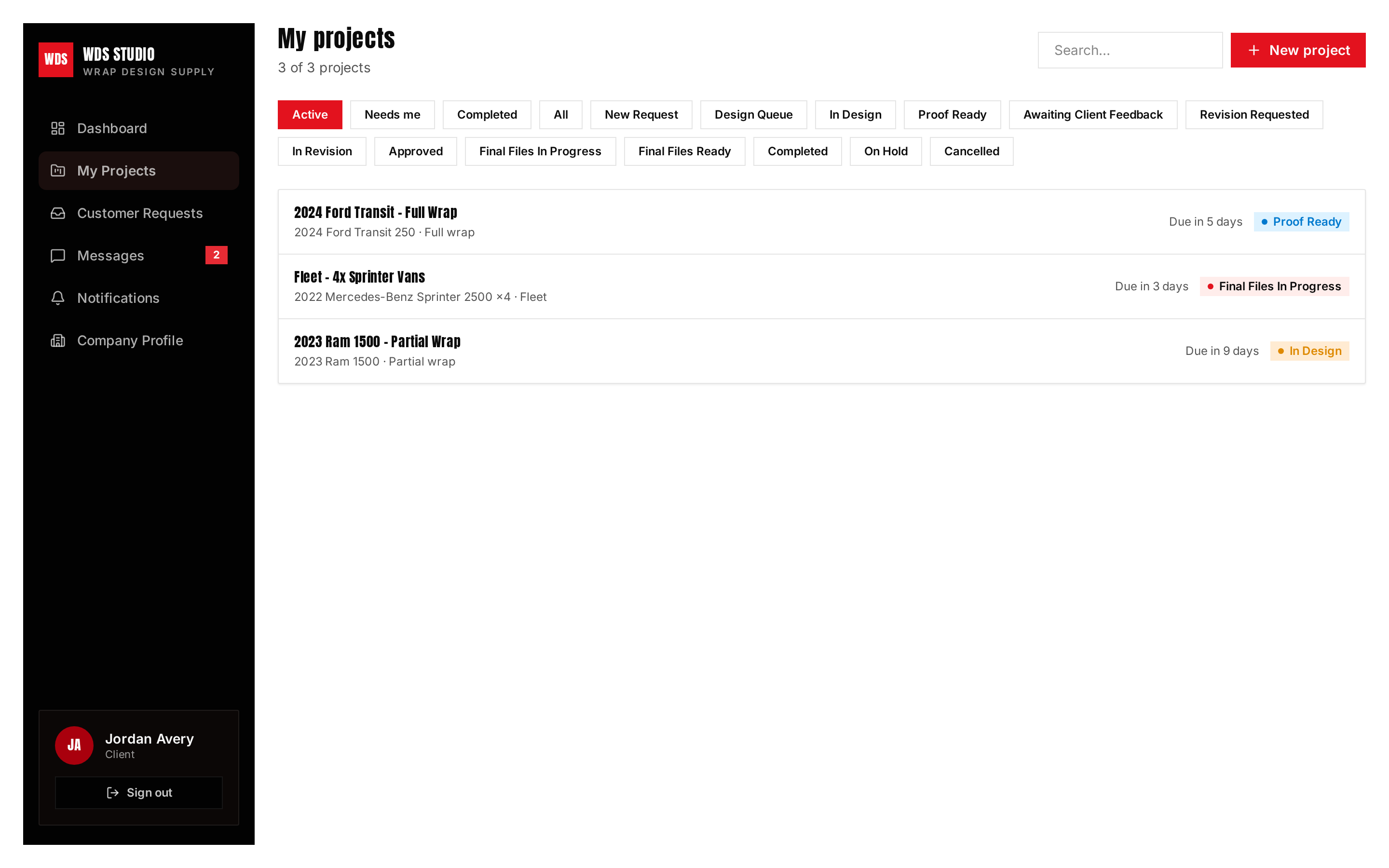
Every vehicle you've sent us, with live status from design queue through production-ready. Filter, search, and open any project — including finished ones.
Step 3
Inside a project
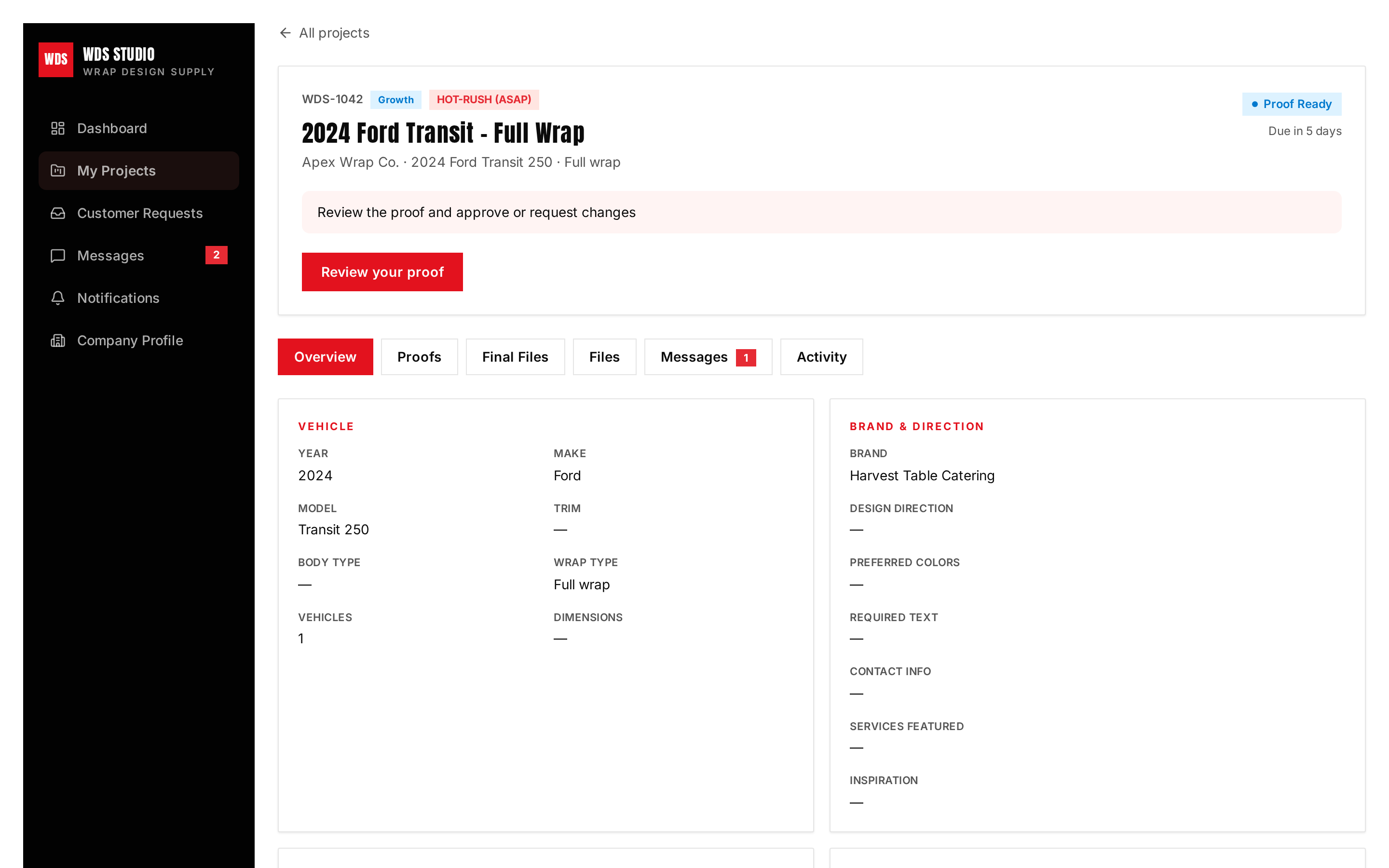
Vehicle details, uploaded photos and brand assets, proof history, messages, and final files — all on one page, organized in tabs.
Step 4
Talk it through
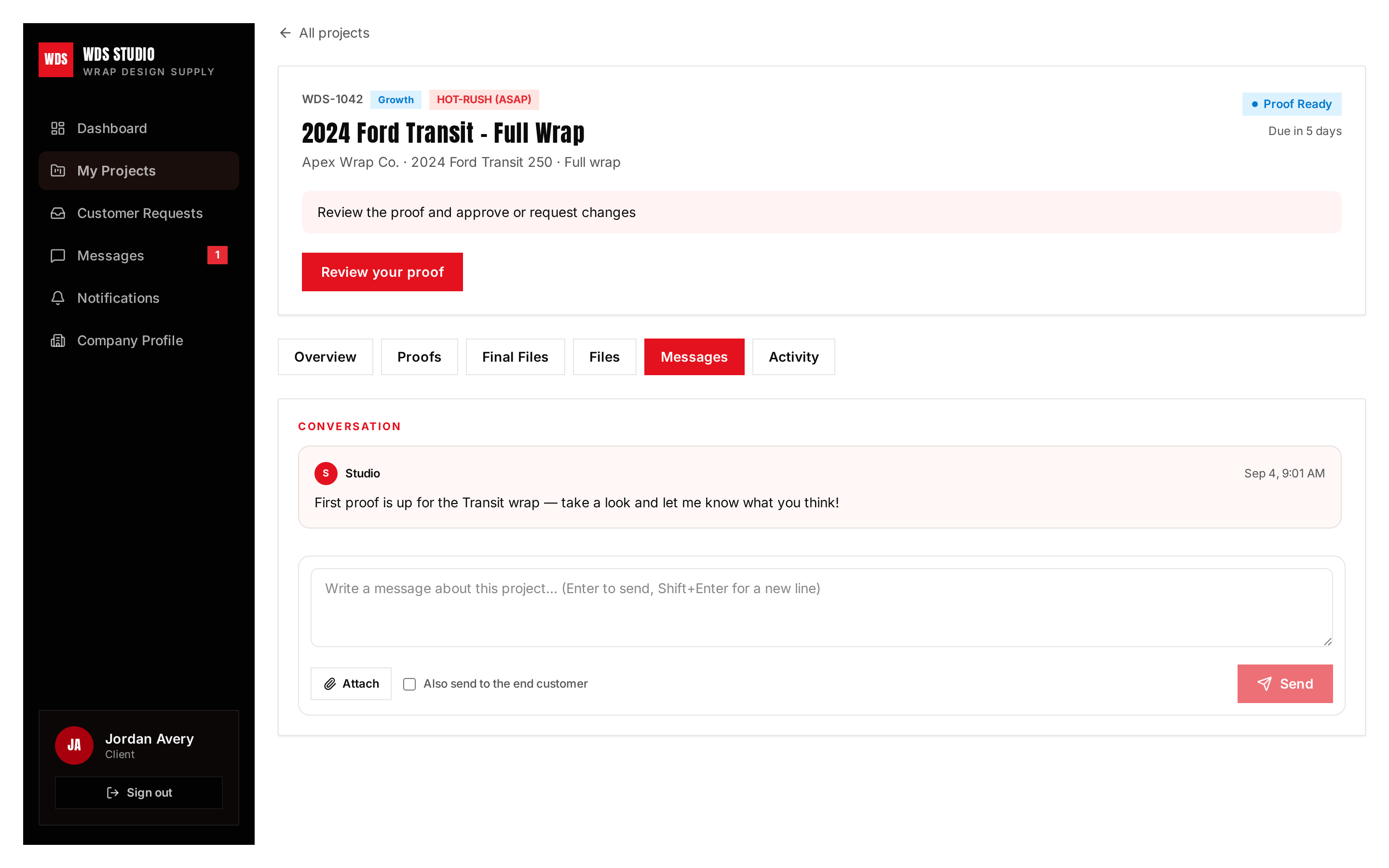
Message the designer on the project itself, attach reference files, and keep the whole history in one place.
Step 5
Designer prepares it. You approve it. Your customer receives it.
You're the wrap shop owner — the approval prompt comes to you, not your customer. You approve the outgoing message first. Your customer reviews the design afterward.
Designer
Uploads the proof + drafts the message
The designer adds the new proof version and prepares the message for your end customer. You don’t have to write or forward it yourself.
You · wrap shop owner
Receives the one-click approval prompt
Review the prepared message in your portal. Choose Approve & send to release it, or Hold to keep it from going out.
Your end customer
Gets the proof from your shop
The approved email carries your shop’s name and branding. To text from your own number, open the prepared text on your phone and press send. Your customer’s feedback comes back into the project.
Step 6
Revisions and approvals come back automatically
When your customer requests changes or approves the design, it lands right back in the project — logged, timestamped, and routed to the designer. No screenshots of texts, no forwarding emails, no “did they say yes?”
Step 7
Final files ready. Project closed. Next one up.
You get notified the moment print-ready final files are uploaded. The project moves to Completed, and the next project in your queue is pulled up automatically.
Why shops keep it
Everything that used to live in texts, emails, and your head
Fully white-labeled to your shop
Proofs and emails to the end customer carry your business name, logo, and colors. Wrap Design Supply never appears in front of your customer.
Customer replies come back to you
Your customer reviews the proof on a branded page and can approve or ask for changes right there. It flows straight back into the project thread.
Works on the phone in your pocket
Approve proofs, answer messages, upload photos, and drop measurements on an image from your phone at the install bay.
You get told when something moves
Alerts when a proof is ready, a revision is done, final files drop, or we message you — in the portal and by email.
Nothing gets lost
Every proof version, approval, revision note, message, and file stays on the project permanently. Full paper trail on every job.
Priority when you need it
Flag a job HOT-RUSH when a customer is waiting, or FILLER when it can ride along. Your queue matches real life.
Locked to your shop
Your projects, customers, files, and messages are visible only to your team. Other shops using WDS Studio can never see them.
Private file storage
Photos, brand assets, proofs, and print files are stored privately and shared through expiring secure links only.
Measurements on any photo
Draw dimension lines right on a vehicle photo from desktop or phone. It saves as a new copy — your original is never changed.
Plans
Pick the number of projects you keep moving
Flat monthly design support — no per-hour billing, no surprise invoices. Your portal shows your plan and how many active projects it covers.
Starter
$1,500/mo
1 active project at a time
Growth
$2,500/mo
2 active projects at a time
Pro
$4,000/mo
3–4 active projects at a time
Scale
$6,500+/mo
4–6+ active projects at a time
Ready when you are
Want a live walkthrough of your own portal?
Portals are set up by invitation, so your shop's projects, files, and customers stay private to you. Reach out and we'll get yours opened.
Private workspace — only your team sees your projects and files
Every proof version and approval kept on record
Your branding on everything your customer sees